Tekton
텍톤 Tekton 은 쿠버네티스 기반 오픈 소스 클라우드 네이티브 CI/CD 시스템입니다.
쿠버네티스 클러스터에 확장 모듈 형태로 설치 및 실행되며, CI/CD 파이프라인 구축에 쓰이는 CRD도 제공합니다.
텍톤 엔진은 쿠버네티스 클러스터 내부에 상주하며 API 객체를 통해 수행할 작업을 선언적으로 정의할 수 있도록 합니다.
태스트 Task, 파이프라인 Pipeline 같은 핵심 컴포넌트를 사용하면 Git 저장소의 내용을 읽어 아티팩트 및 컨테이너를 만드는 파이프라인을 정의할 수 있습니다.
또한 텍톤은 트리거 Trigger 를 사용하여 파이프라인을 자동으로 시작하는 메커니즘도 지원합니다.
GitHub 액션 등 GitOps 를 지원하는 다른 솔루션도 있습니다.
Tekton의 주요 객체
| 개념 | 역할 | 설명 |
| Task | 하나의 작업 단위 | 여러 개의 Step(컨테이너)으로 구성된 “작업 레시피”.예: 코드 빌드, 테스트, 이미지 푸시 |
| Pipeline | Task들의 조합 | Task 여러 개를 순서 또는 조건에 따라 실행하는 파이프라인 정의 |
| TaskRun | Task 실행 결과 | 특정 Task를 실제로 실행한 “인스턴스” (1회 실행 기록) |
| PipelineRun | Pipeline 실행 결과 | Pipeline을 실행한 실제 “인스턴스”, 내부에 여러 TaskRun 포함 |
| Trigger | 자동 실행 조건 | 이벤트(Git push 등)를 감지해서 자동으로 PipelineRun을 생성함 |
Tekton 주요 구성 요소
| 구성요소 | 역할 |
| Tekton Pipelines | 핵심 엔진. Task, Pipeline 등 파이프라인 로직을 정의하고 실행 |
| Tekton Triggers | GitHub Push, PR Merge, Webhook 등의 이벤트를 감지해 Pipeline을 자동 실행 |
| Tekton Dashboard | 실행 중인 파이프라인과 로그를 웹 UI로 시각화 |
| Tekton CLI (tkn) | 파이프라인 관리용 CLI 도구 (kubectl 비슷함) |
| Tekton Catalog | 커뮤니티에서 만든 Task/Pipeline 모음집 (재사용 가능) |
| Tekton Hub | Tekton Catalog를 GUI로 탐색할 수 있는 웹 UI |
| Tekton Operator | Tekton 설치/업데이트/삭제를 자동 관리하는 Kubernetes Operator |
| Tekton Chains | 실행 결과(빌드 산출물)에 서명 및 출처 검증을 위한 보안 컴포넌트 |
┌────────────┐
│  Trigger   │ ← Git push, Webhook 등 이벤트
└─────┬──────┘
      │
      ▼
┌──────────────┐
│ PipelineRun  │  ← 파이프라인 실행 인스턴스
│  ├─ TaskRun  │
│  ├─ TaskRun  │
│  └─ TaskRun  │
└──────────────┘
Trigger가 PipelineRun을 만들고, PipelineRun이 여러 TaskRun을 실행하고, TaskRun 안에서 Step 컨테이너들이 동작합니다.
Steps, Tasks, Pipeline
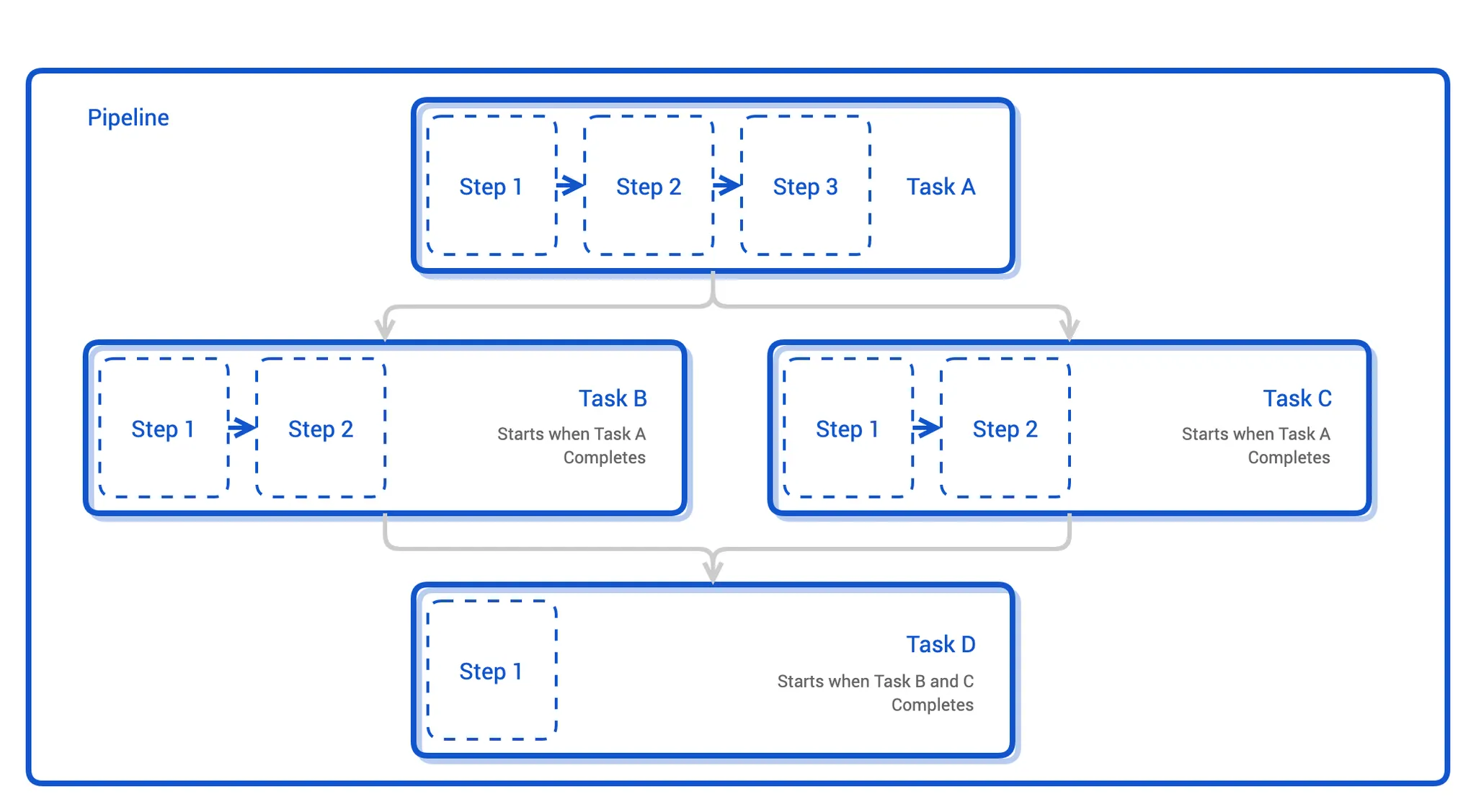
https://tekton.dev/docs/concepts/concept-model/
Concept model
Basic Tekton components and data model
tekton.dev
TaskRuns and PipelineRuns
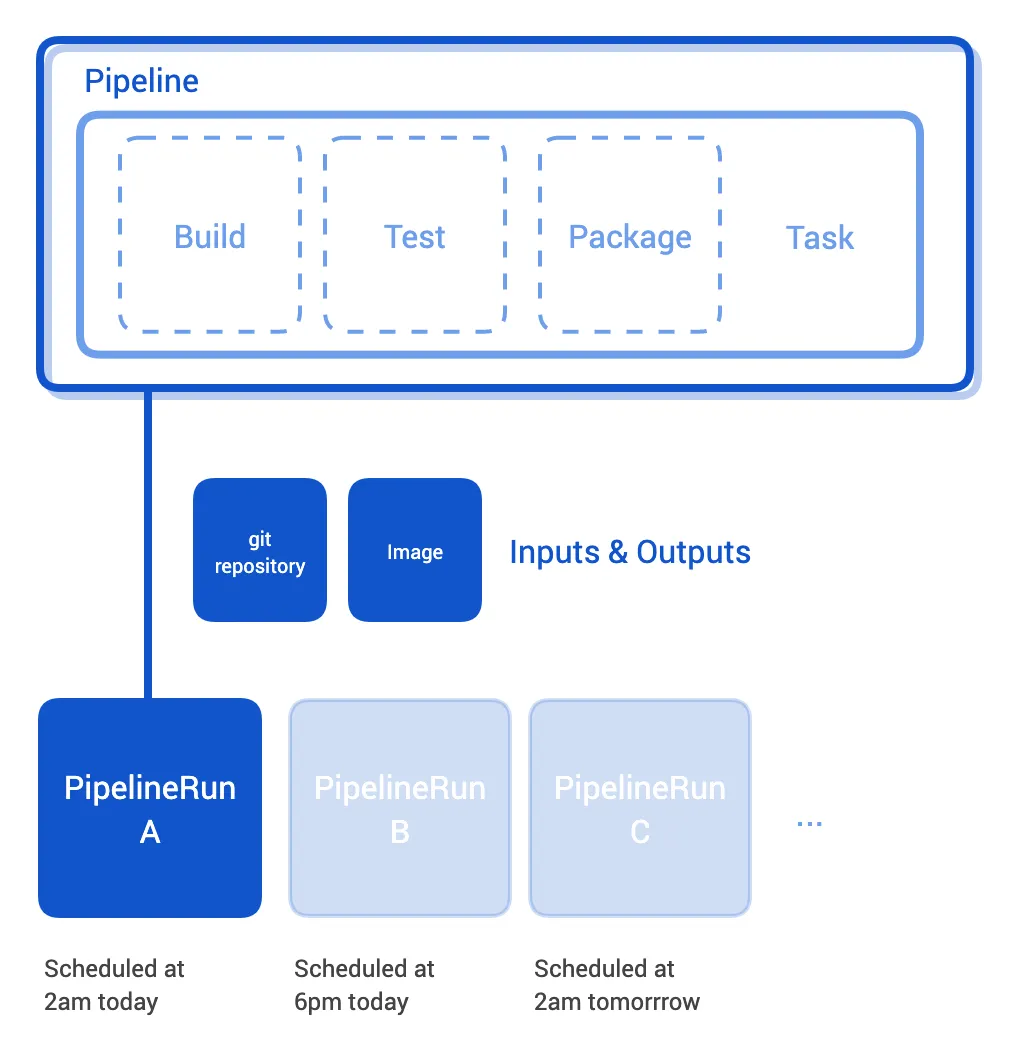
- Build – 소스코드 빌드
- Test – 단위 테스트 실행
- Package – 컨테이너 이미지 빌드
- Deploy – 애플리케이션 배포
| Pipeline | 빌드·테스트·배포 등 일련의 단계 정의 |
| Task | Pipeline 안의 개별 단계 |
| PipelineRun | Pipeline을 실제 실행한 결과 |
| Inputs/Outputs | 각 단계 간 데이터 흐름 (소스코드, 이미지 등) |
Tekton Chains
빌드 결과에 대한 서명, 증명을 통한 신뢰성을 높이는 보안 모듈
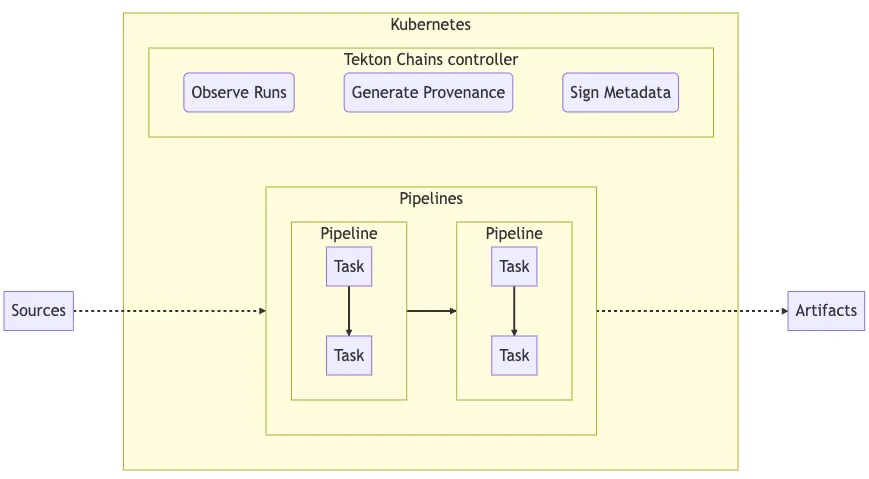
흐름
- 개발자가 GitHub에 코드를 push (→ Source)
- Tekton Pipeline이 트리거됨 → build → test → package 단계 수행
- Tekton Chains가 이 실행(PipelineRun)을 감지
- Chains가 Provenance 데이터(빌드한 코드 commit, 이미지 digest, 타임스탬프 등) 생성
- Chains가 이 데이터를 서명(Sign) 후 안전한 저장소(GCS, OCI registry 등)에 업로드
- 최종 Artifact(이미지, 바이너리)가 “신뢰 가능한 빌드 결과물”로 등록
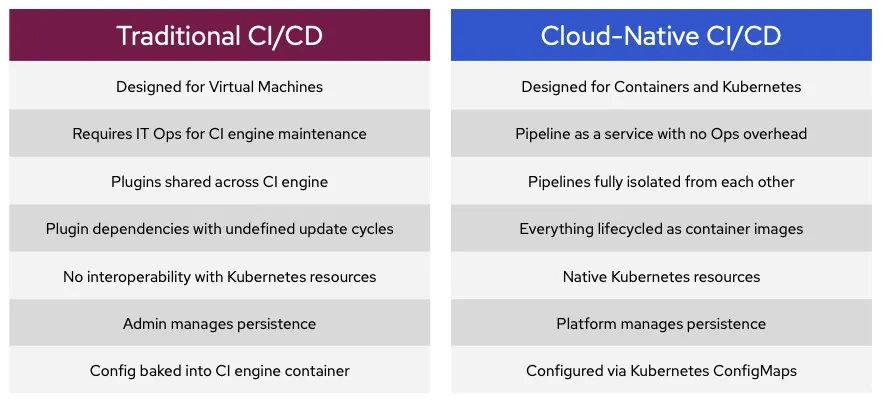
Jenkins vs Tekton
VM위에서 동작하는 서버 중심적인 모델인 Jenkins와 달리 컨테이너 중심형 모델입니다.
모든 Job이 같은 플러그인 집합을 공유해서 생기는 버전 충돌, 의존성 문제가 없습니다.
설정이 엔진에 있는 Jenkins와 달리 Tekton과 같은 클라우드 네이티브 CI/CD는 선언적 관리가 가능합니다.
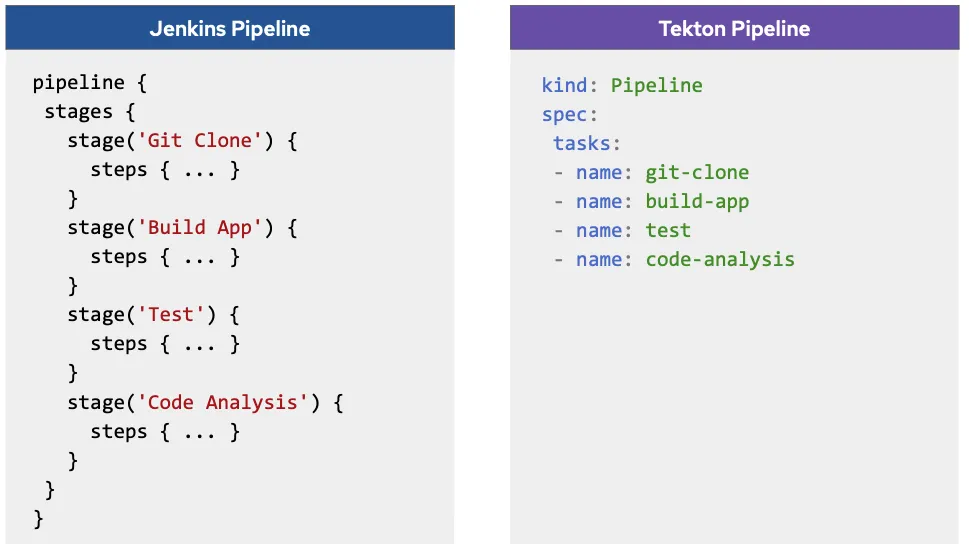
Jenkins의 파이프라인
보통 사용되는 Jenkinsfile로 익숙한 포맷입니다.
아래 Groovy 기반의 Jenkinsfile은 Jenkins 서버 내부에서 실행됩니다
하나의 스크립트 내에서 stage(단계)로 정의되고 실행됩니다.
예제에서 stage는 빌드의 논리적단계인 Clone -> Build -> Test 과정을 거칩니다.
git, maven, docker 등은 Jenkins 플러그인으로 관리
pipeline {
  agent { label 'maven' }
  stages {
    stage('Clone') {
      git url: 'https://github.com/...'
    }
    stage('Build App') {
      withMaven(maven: 'maven-3') {
        sh "mvn clean verify"
      }
    }
  }
}
Tekton 의 파이프라인
언어는 YAML (쿠버네티스 리소스 정의) 이고 쿠버네티스 파드로 실행됩니다.
Task 단위로 조합됩니다. (Task = 실행 단위 작업으로, 개별 컨테이너)
runAfter로 의존관계 순서를 정의합니다 (git-clone → build-app)
Tekton Catalog의 Task (ex. git-clone, maven) 사용하여 플러그인을 대체합니다.
상태는 쿠버네티스가 CRD 객체로 관리합니다.
kind: Pipeline
spec:
  tasks:
    - name: git-clone
      taskRef:
        name: git-clone
      params:
        - name: url
          value: https://github.com/...
      workspaces:
        - name: app-workspace
          workspace: app-source

    - name: build-app
      taskRef:
        name: maven
      params:
        - name: GOALS
          value: ["clean", "verify"]
      runAfter:
        - git-clone
      workspaces:
        - name: app-workspace
          workspace: app-source
쿠버네티스가 관리
Tekton 구성요소 설치
Pipeline
Task / Pipeline 정의 및 실행 (핵심 엔진)
Pipeline, Task, TaskRun, PipelineRun 등의 CRD를 쿠버네티스에 등록해서 쿠버네티스가 파이프라인을 리소스로 인식합니다.
# Tekton dependency 파이프라인(pipeline) 설치 : 현재 v1.5.0
kubectl apply -f https://storage.googleapis.com/tekton-releases/pipeline/latest/release.yaml

# Tekton dependency 파이프라인(pipeline) 설치 확인
kubectl get crd
kubectl get ns | grep tekton
kubectl get-all -n tekton-pipelines # kubectl krew install get-all
kubectl get all -n tekton-pipelines
kubectl get-all -n tekton-pipelines-resolvers
kubectl get all -n tekton-pipelines-resolvers

# 파드 확인
# Tekton의 제어 로직과 CRD 이벤트를 감시하는 핵심 컨트롤러
kubectl get pod -n tekton-pipelines
NAME                                          READY   STATUS    RESTARTS   AGE
tekton-events-controller-784b978c84-8wfss     1/1     Running   0          42s
tekton-pipelines-controller-95ff54f47-2zrxk   1/1     Running   0          42s
tekton-pipelines-webhook-7b5ff8d7ff-dgmvj     1/1     Running   0          42s
Trigger
이벤트 기반(예: Git push)으로 Pipeline 실행
- EventListener : 이벤트 수신 (예: webhook)
- TriggerBinding : 이벤트 데이터를 변수에 매핑
- TriggerTemplate : PipelineRun 생성 템플릿
# Tekton Trigger 설치 : 현재 v0.33.0
kubectl apply -f https://storage.googleapis.com/tekton-releases/triggers/latest/release.yaml
kubectl apply -f https://storage.googleapis.com/tekton-releases/triggers/latest/interceptors.yaml

# Tekton Trigger 설치 확인
kubectl get crd | grep triggers # trigger 관련 crd 확인
kubectl get all -n tekton-pipelines

# trigger 관련 deployment 설치 확인
k get deploy -n tekton-pipelines | grep triggers
tekton-triggers-controller          1/1     1            1           3m9s
tekton-triggers-core-interceptors   1/1     1            1           99s
tekton-triggers-webhook             1/1     1            1           3m9s
Dashboard
Tekton 실행 상태를 웹에서 시각화
노드포트로 서비스를 변경하여 외부 접근 가능하게 설정하였습니다.
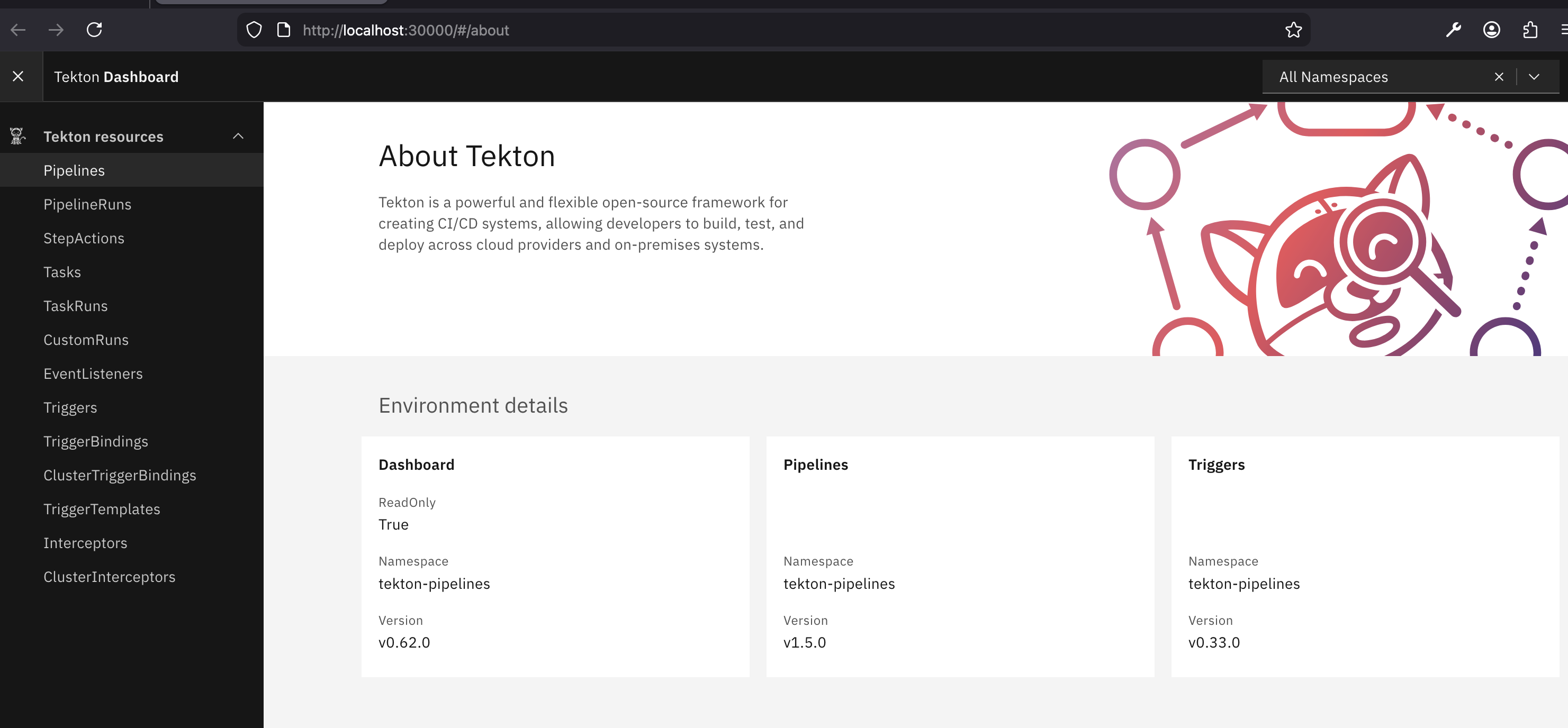
# Tekton Dashboard 설치 : 현재 v0.62.0
kubectl apply -f https://storage.googleapis.com/tekton-releases/dashboard/latest/release.yaml

# Tekton Dashboard 설치 확인
kubectl get crd | grep dashboard # dashboard 관련 crd 확인
kubectl get all -n tekton-pipelines

# Dashboard 관련 deployment 설치 확인
kubectl get deploy -n tekton-pipelines
tekton-dashboard                    1/1     1            1           81s
...

# service 정보 확인
kubectl get svc,ep -n tekton-pipelines tekton-dashboard
kubectl get svc -n tekton-pipelines tekton-dashboard -o yaml | kubectl neat | yq

# service 를 Nodeport 설정 : nodePort 30000
kubectl patch svc -n tekton-pipelines tekton-dashboard -p '{"spec":{"type":"NodePort","ports":[{"port":9097,"targetPort":9097,"nodePort":30000}]}}'
kubectl get svc,ep -n tekton-pipelines tekton-dashboard

# 텍톤 대시보드 접속
open http://localhost:30000   # macOS 경우
웹 브라우저 http://<Ubuntu IP>:30000   # Windows WSL2 Ubuntu 경우
tekton CLI
Tekton 리소스 관리용 명령줄 도구
# macOS
brew install tektoncd-cli

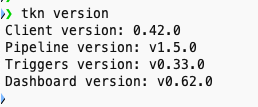
tkn version
Client version: 0.42.0
Pipeline version: v1.5.0
Triggers version: v0.33.0
Dashboard version: v0.62.0


# Windows WSL - Ubuntu Linux 경우
sudo apt update;sudo apt install -y gnupg
sudo mkdir -p /etc/apt/keyrings/
sudo gpg --no-default-keyring --keyring /etc/apt/keyrings/tektoncd.gpg --keyserver keyserver.ubuntu.com --recv-keys 3EFE0E0A2F2F60AA
echo "deb [signed-by=/etc/apt/keyrings/tektoncd.gpg] http://ppa.launchpad.net/tektoncd/cli/ubuntu eoan main"|sudo tee /etc/apt/sources.list.d/tektoncd-ubuntu-cli.list
sudo apt update && sudo apt install -y tektoncd-cli
...
tkn version
Create a Hello World Task
간단한 Task 를 하나 만들어 텍톤을 사용해봅니다.
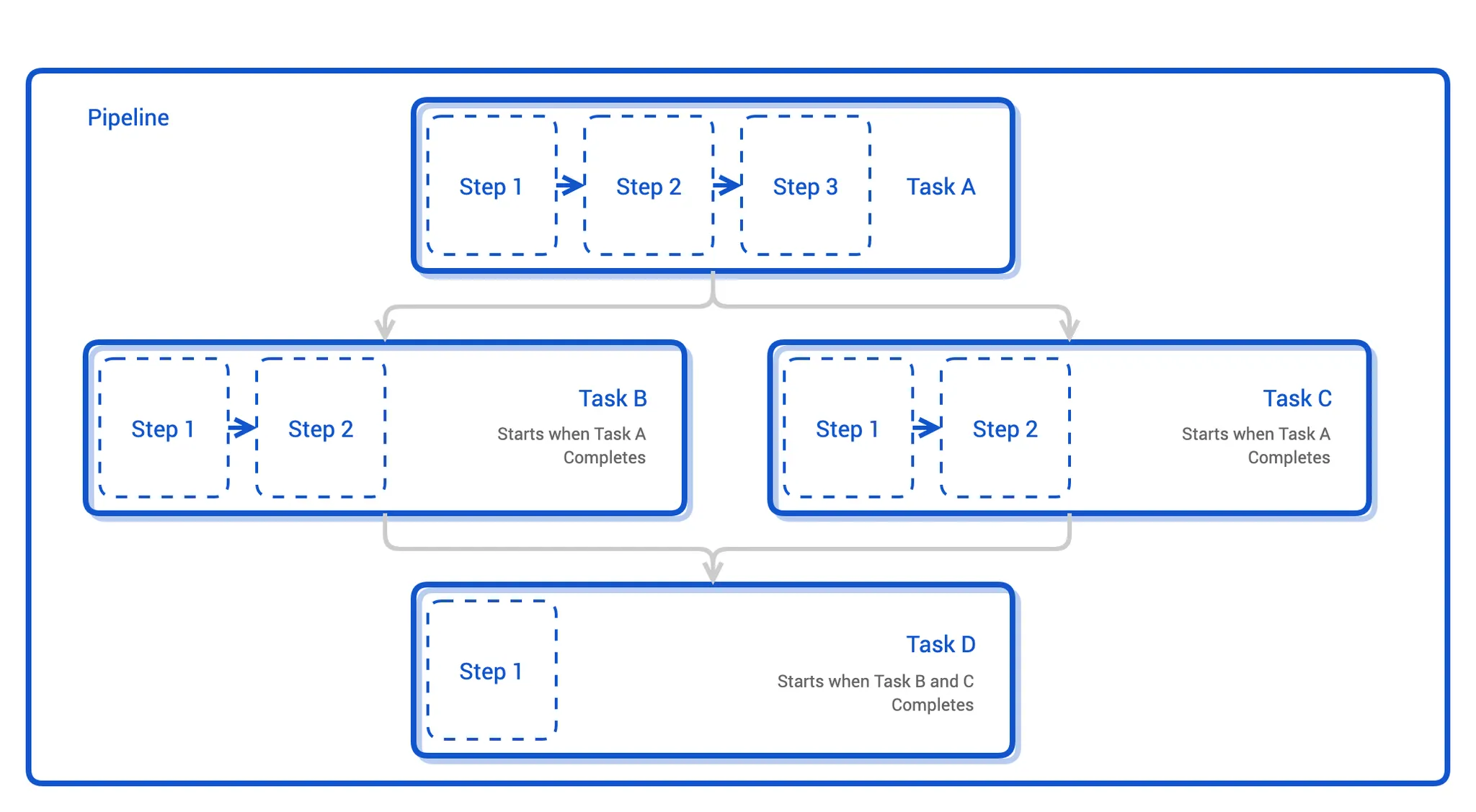
Task는 파드로 실행되며 내부 Task에는 일련의 단계 stage가 컨테이너로 실행됩니다.
한 Task 안의 각 단계들은 순차적으로 실행되지만, Task들끼리는 서로 병렬적으로 실행될 수 있습니다.
Task 생성
https://tekton.dev/docs/getting-started/tasks/
Getting started with Tasks
Set up and run your first Tekton Task
tekton.dev
#
kubectl explain tasks.tekton.dev
GROUP:      tekton.dev
KIND:       Task
VERSION:    v1

# task 생성
cat << EOF | kubectl apply -f -
apiVersion: tekton.dev/v1
kind: Task
metadata:
  name: hello
spec:
  steps:
    - name: echo    # step 이름
      image: alpine # step 수행 컨테이너 이미지
      script: |
        #!/bin/sh
        echo "Hello World"
EOF

# 확인
tkn task list
kubectl get tasks
kubectl get tasks -o yaml | kubectl neat | yq
kubectl get pod
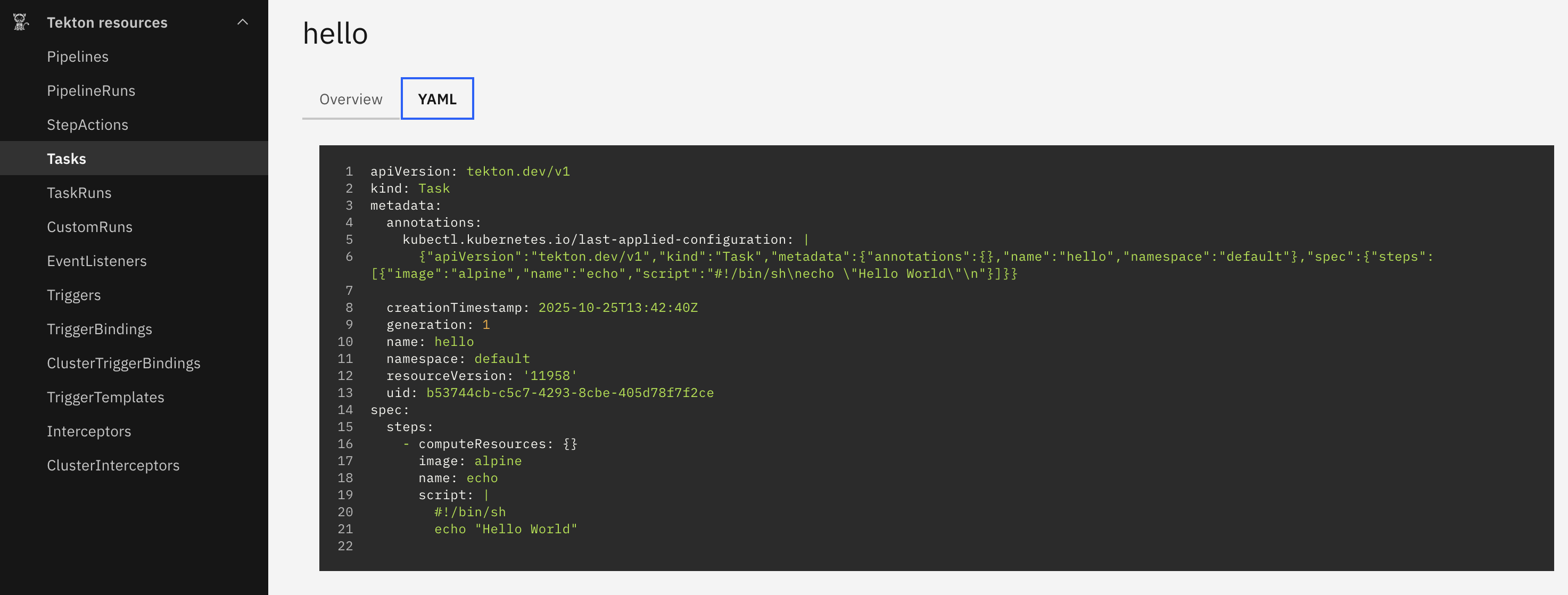
대시보드에서 생성한 Task를 확인할 수 있습니다.
tkn CLI로 task 시작
Task 실행 → Pod 내부 구조 관찰 → 로그 확인
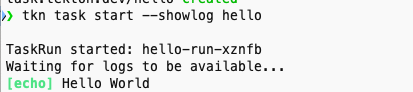
hello라는 Task를 실행하고(TaskRun 자동 생성) 합니다.
# 신규 터미널 : 파드 상태 모니터링
kubectl get pod -w

# tkn CLI로 task 시작
tkn task start --showlog hello
TaskRun started: hello-run-722sp
Waiting for logs to be available...
[echo] Hello World
kubectl describe pod -l tekton.dev/task=hello 로 보면 Pod 안에 아래 3개의 컨테이너가 존재합니다
| Init Container | prepare | Tekton이 Step 실행 환경 초기화 (entrypoint 설정 등) |
| Init Container | place-scripts | 스크립트를 Pod 내부 /tekton/scripts 에 배치 |
| Main Container | step-echo | 사용자가 정의한 실제 명령 (echo "Hello World") 실행 |
# 파드 내, '2개의 init 컨테이너, 1개의 컨테이너' 확인
kubectl describe pod -l tekton.dev/task=hello
...
Init Containers:
  prepare:
    Container ID:  containerd://f3555c826468ae6b6888f3406e42fe8cfa155c9f405941691d8aa9b4d4f3b40d
    Image:         ghcr.io/tektoncd/pipeline/entrypoint-bff0a22da108bc2f16c818c97641a296:v0.70.0@sha256:763d4cd4e362d381b46a5474d3d358e7731d7c13e22ebf632ef530b857521a48
    ...
  place-scripts:
    Container ID:  containerd://959bd6f8d513781ab7c3294b8be1ac92a9765897b5e4b007c94a21e37e49f100
    Image:         cgr.dev/chainguard/busybox@sha256:19f02276bf8dbdd62f069b922f10c65262cc34b710eea26ff928129a736be791
    ...
Containers:
  step-echo:
    Container ID:  containerd://98bef2bfee42c890df0bc0347fecfdebd52613ffda308a8248b359f4507fafc5
    Image:         alpine
    Image ID:      docker.io/library/alpine@sha256:4b7ce07002c69e8f3d704a9c5d6fd3053be500b7f1c69fc0d80990c2ad8dd412
...
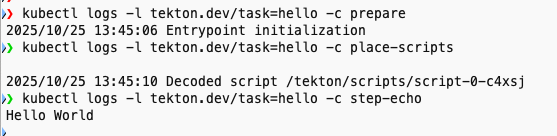
아래와 같이 각 컨테이너에서 개별 로그를 확인 가능합니다.
# 로그 확인
kubectl logs -l tekton.dev/task=hello -c prepare
kubectl logs -l tekton.dev/task=hello -c place-scripts
kubectl logs -l tekton.dev/task=hello -c step-echo
Hello World
혹은
kubectl stern -l tekton.dev/task=hello   # kubectl krew install stern

#
tkn task logs hello
tkn task describe hello
Name:        hello
Namespace:   default

🦶 Steps
 ∙ echo

🗂  Taskruns
NAME              STARTED         DURATION   STATUS
hello-run-722sp   6 minutes ago   19s        Succeeded

#
tkn taskrun logs
tkn taskrun list
NAME              STARTED         DURATION   STATUS
hello-run-722sp   7 minutes ago   19s        Succeeded

# 다음 실습을 위해 taskrun 삭제
kubectl delete taskruns --all
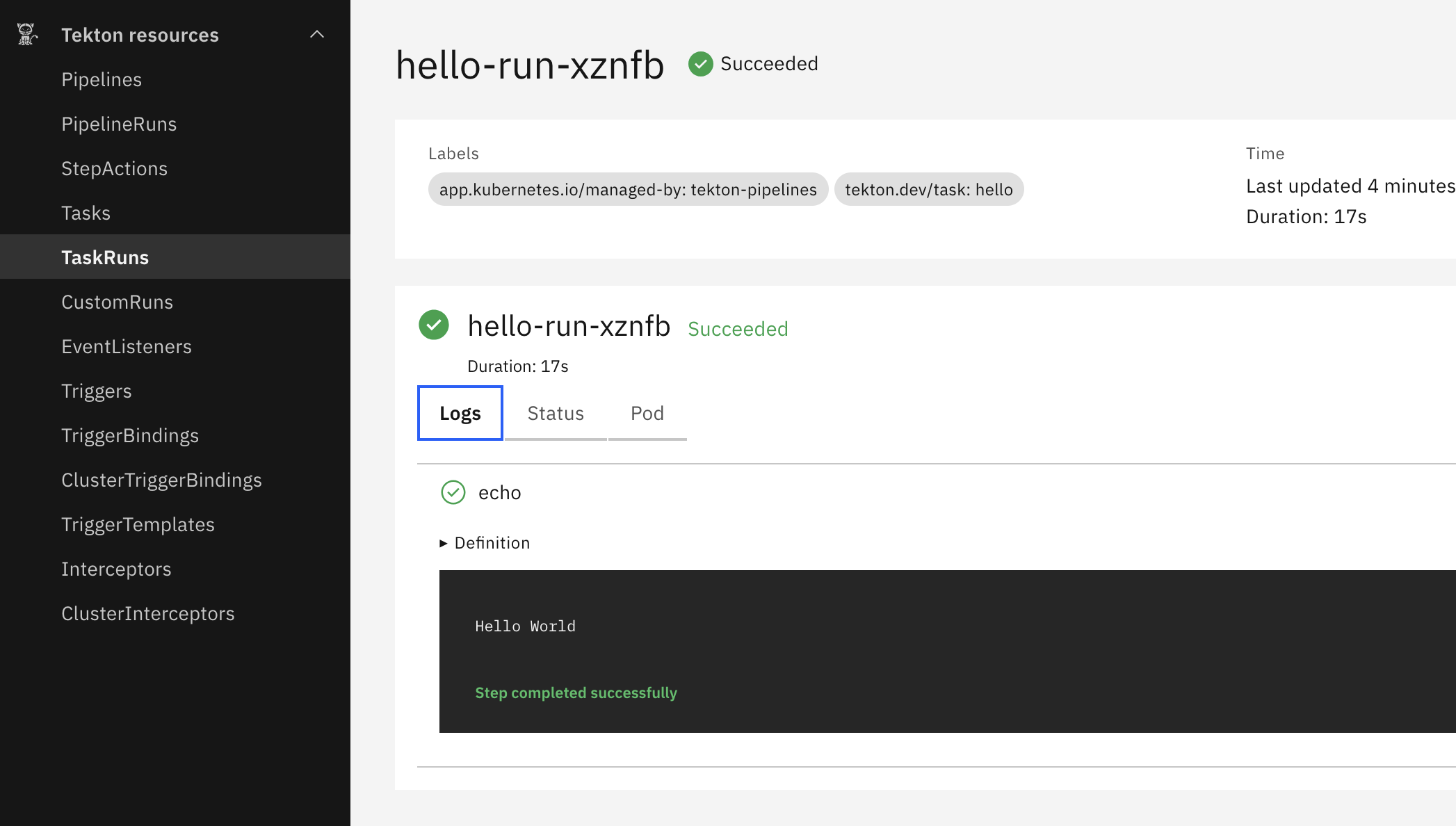
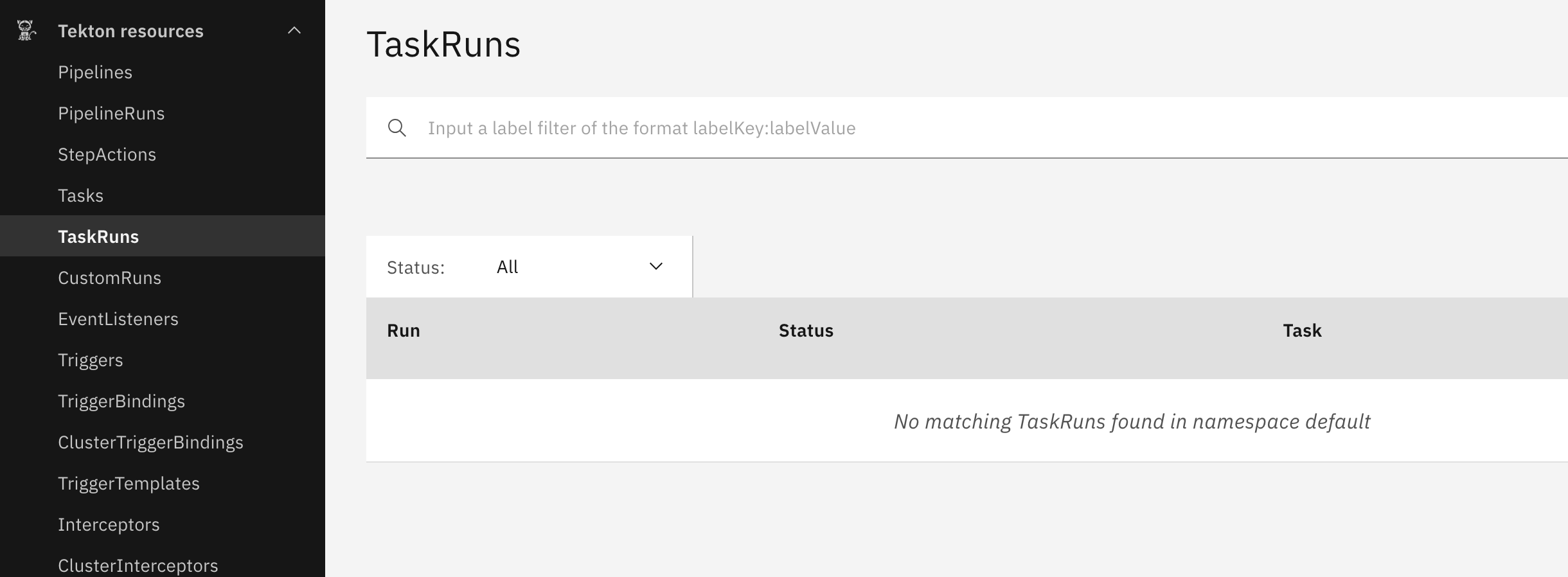
대시보드 - TaskRuns에서 확인가능합니다.
kubectl delete taskruns --all
Task 정의(Task)는 그대로 두고 실행 기록(TaskRun)만 지우는 명령입니다.
실행하면 대시보드에서 제거된 것을 확인가능합니다.
Task 내에 step 별 컨테이너 실습
# task 생성
cat << EOF | kubectl apply -f -
apiVersion: tekton.dev/v1
kind: Task
metadata:
  name: two-step
spec:
  steps:
    - name: echo1
      image: alpine
      script: |
        #!/bin/sh
        echo "Hello World 11111"
    - name: echo2
      image: alpine
      script: |
        #!/bin/sh
        echo "Hello World 22222"
EOF

# taskrun
tkn task start --showlog two-step
TaskRun started: two-step-run-tt7rs
Waiting for logs to be available...
[echo1] Hello World 11111
[echo2] Hello World 22222

# 1개의 파드에 2개의 실행 컨테이터 확인 (초기화 컨테이너 제외)
kubectl get pod
NAME                     READY   STATUS      RESTARTS   AGE
two-step-run-tt7rs-pod   0/2     Completed   0          61s

#
kubectl describe pod -l tekton.dev/task=two-step
...
Containers:
  step-echo1:
    Container ID:  containerd://488f54e31a88a57d79b842146906ed408f04ccfb5db357cd658ffcaa3952497f
    Image:         alpine
    ...
  step-echo2:
    Container ID:  containerd://d1d24689992753cb64388005b9ae07c0f0fefa284166004a1f125359783d536d
    Image:         alpine
...

# 다음 실습을 위해 삭제
kubectl delete taskruns.tekton.dev --all
Create a Task to Compile and Package an App from Git
텍톤을 사용하여 Git 저장소에 보관된 앱 코드를 컴파일하고 패키징하는 작업을 자동화
텍톤은 Task 간 데이터 흐름을 제어가 가능한 구조입니다.
Tekton Task 리소스의 선택적(옵션) 필드
| 입력 | inputs | 소비되는 리소스 (deprecated) | 이 Task가 외부로부터 받는 데이터. 현재는 params나 workspaces로 대체됨 |
| 출력 | outputs | 생성되는 리소스 (deprecated) | 이 Task가 수행 후 만들어내는 결과물. 현재는 results나 workspaces로 대체됨 |
| 입력 파라미터 | params | 인자(Arguments) 전달 | Task 내부의 Step에서 사용할 변수 값 정의. CLI나 Pipeline에서 값 주입 가능 |
| 결과 값 | results | 실행 결과 저장 | Task가 실행 후 만들어내는 값 (문자열, 경로 등). 이후 다른 Task에서 참조 가능 |
| 작업 볼륨 | workspaces | 데이터 공유 볼륨 | 여러 Step 또는 다른 Task 간 파일 기반 데이터 공유용 볼륨 경로 |
| 외부 볼륨 | volumes | 커스텀 볼륨 마운트 | ConfigMap, Secret, PVC 등 외부 쿠버네티스 볼륨을 직접 Task에 마운트할 때 사용 |
params
Task에 전달할 인자값(variables) 정의
params:
  - name: message
    description: 출력할 메시지
    default: "Hello Tekton"

# 사용
echo "$(params.message)"
results
Task 실행 결과를 저장해서 다른 Task나 Pipeline 단계에서 참조 가능하게 합니다.
results:
  - name: output
    description: 결과 메시지

# 실행
echo "done" | tee $(results.output.path)
workspaces
Task 간 또는 Step 간 공유 볼륨 정의
workspaces:
  - name: shared-data
    description: Task 간 공유 파일 볼륨

# 실행
echo "data" > $(workspaces.shared-data.path)/file.txt
volumes
Task가 외부 쿠버네티스 리소스(ConfigMap, PVC 등)를 직접 마운트하도록 지정
volumes:
  - name: config-volume
    configMap:
      name: app-config

# step에서 아래와 같이 사용
volumeMounts:
  - name: config-volume
    mountPath: /config
Tekton Pipelines를 사용하여 git에서 소스 코드를 복제
https://tekton.dev/docs/how-to-guides/clone-repository/
Clone a git repository with Tekton
How to clone source code from git with Tekton Pipelines.
tekton.dev
- Task에 속한 각 단계 step 와 Task 는 텍톤 워크스페이스 workspace 라 불리는 파일 시스템을 공유할 수 있다.
- 이 공유 파일 시스템은 PVC로 만들어진 파일 시스템이거나 ConfigMap 혹은 emptyDir 불륨을 사용한다.
- Task 는 param 인자를 받을 수 있으며, 그 인자를 통해 실제 작업 내용을 동적으로 결정할 수 있다.
여러 Task를 연결해서 실행하는 파이프라인을 정의합니다.
Git 저장소를 클론한 다음, 그 결과를 다음 Task에서 활용할 준비를 하는 파이프라인
위에서 확인 한 것처럼,
- params 로 Git 저장소 URL을 외부에서 입력받음
- workspaces 로 파일을 공유함
- tasks 로 실제 git-clone Task를 실행함
# 파이프라인 파일 작성
cat << EOF | kubectl apply -f -
apiVersion: tekton.dev/v1
kind: Pipeline
metadata:
  name: clone-read
spec:
  description: |
    This pipeline clones a git repo, then echoes the README file to the stout.
  params:     # 매개변수 repo-url
  - name: repo-url
    type: string
    description: The git repo URL to clone from.
  workspaces: # 다운로드할 코드를 저장할 공유 볼륨인 작업 공간을 추가
  - name: shared-data
    description: |
      This workspace contains the cloned repo files, so they can be read by the
      next task.
  tasks:      # task 정의
  - name: fetch-source
    taskRef:
      name: git-clone
    workspaces:
    - name: output
      workspace: shared-data
    params:
    - name: url
      value: \$(params.repo-url)
EOF

# 확인
tkn pipeline list
tkn pipeline describe
kubectl get pipeline
kubectl get pipeline -o yaml | kubectl neat | yq
kubectl get pod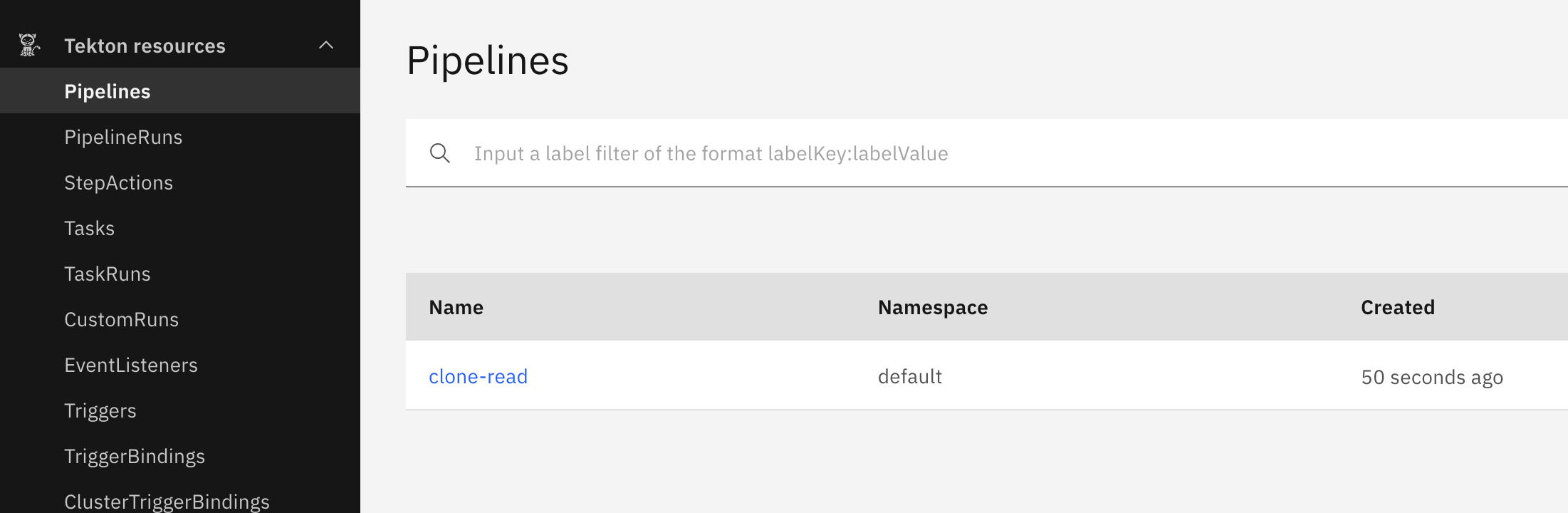
# 파이프라인 실행 : 파이프라인을 인스턴스화하고 실제 값 설정
cat << EOF | kubectl create -f -
apiVersion: tekton.dev/v1
kind: PipelineRun
metadata:
  generateName: clone-read-run-
spec:
  pipelineRef:
    name: clone-read
  taskRunTemplate:
    podTemplate:
      securityContext:
        fsGroup: 65532
  workspaces: # 작업 공간 인스턴스화, PVC 생성
  - name: shared-data
    volumeClaimTemplate:
      spec:
        accessModes:
        - ReadWriteOnce
        resources:
          requests:
            storage: 1Gi
  params:    # 저장소 URL 매개변수 값 설정
  - name: repo-url
    value: https://github.com/tektoncd/website
EOF

#
kubectl get pipelineruns -o yaml | kubectl neat | yq
kubectl get pipelineruns
NAME                   SUCCEEDED   REASON           STARTTIME   COMPLETIONTIME
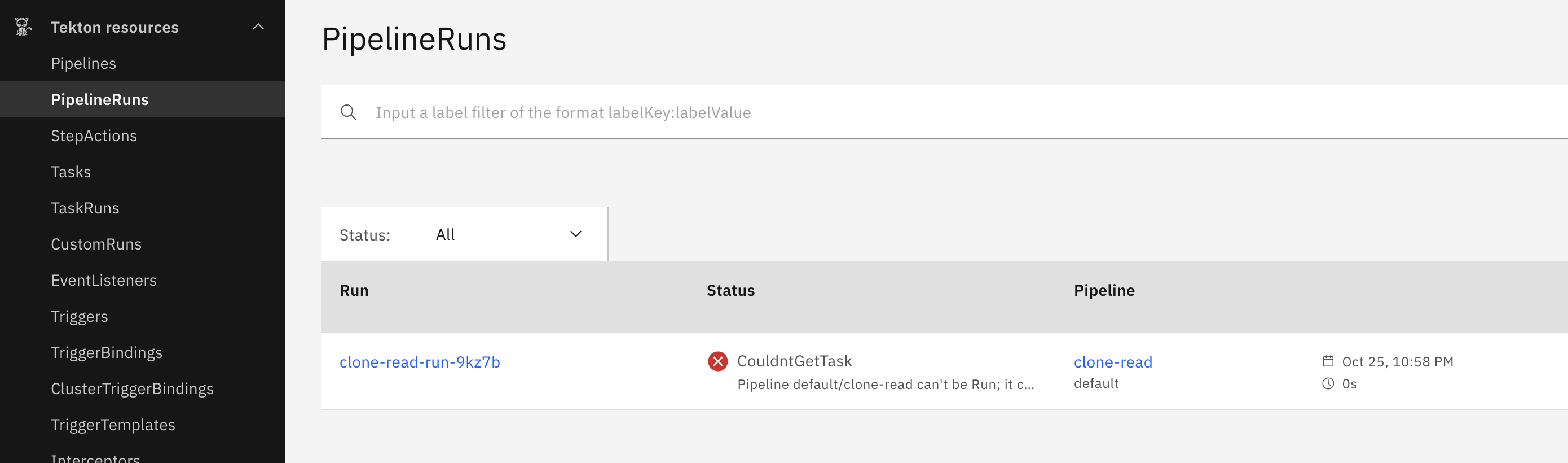
clone-read-run-lvkzq   False       CouldntGetTask   2m41s       2m41s

tkn pipelinerun list
NAME                   STARTED         DURATION   STATUS
clone-read-run-lvkzq   3 minutes ago   0s         Failed(CouldntGetTask)

tkn pipelinerun logs clone-read-run-lvkzq -f
Pipeline default/clone-read can't be Run; it contains Tasks that don't exist: Couldn't retrieve Task "git-clone": tasks.tekton.dev "git-clone" not found

#
kubectl get tasks
NAME    AGE
hello   13m
Pipeline이 참조하려는 Task(git-clone)가 클러스터 안에 존재하지 않기 때문에 실패합니다.
git-clone 을 위한 설치를 진행합니다.
Pipeline → PipelineRun → Task(git-clone) → PVC(workspace) → Pod 실행 → 로그 확인 → 정리
# 파이프라인에서 git clone 작업을 사용하려면 먼저 클러스터에 설치 필요 : tacket hub 에서 가져오기
tkn hub install task git-clone
WARN: This version has been deprecated
Task git-clone(0.9) installed in default namespace

# 추가된 task 확인
kubectl get tasks
kubectl get tasks git-clone -o yaml | kubectl neat | yq

# 파이프라인 재실행
cat << EOF | kubectl create -f -
apiVersion: tekton.dev/v1
kind: PipelineRun
metadata:
  generateName: clone-read-run-
spec:
  pipelineRef:
    name: clone-read
  taskRunTemplate:
    podTemplate:
      securityContext:
        fsGroup: 65532
  workspaces:
  - name: shared-data
    volumeClaimTemplate:
      spec:
        accessModes:
        - ReadWriteOnce
        resources:
          requests:
            storage: 1Gi
  params:
  - name: repo-url
    value: https://github.com/tektoncd/website
EOF

#
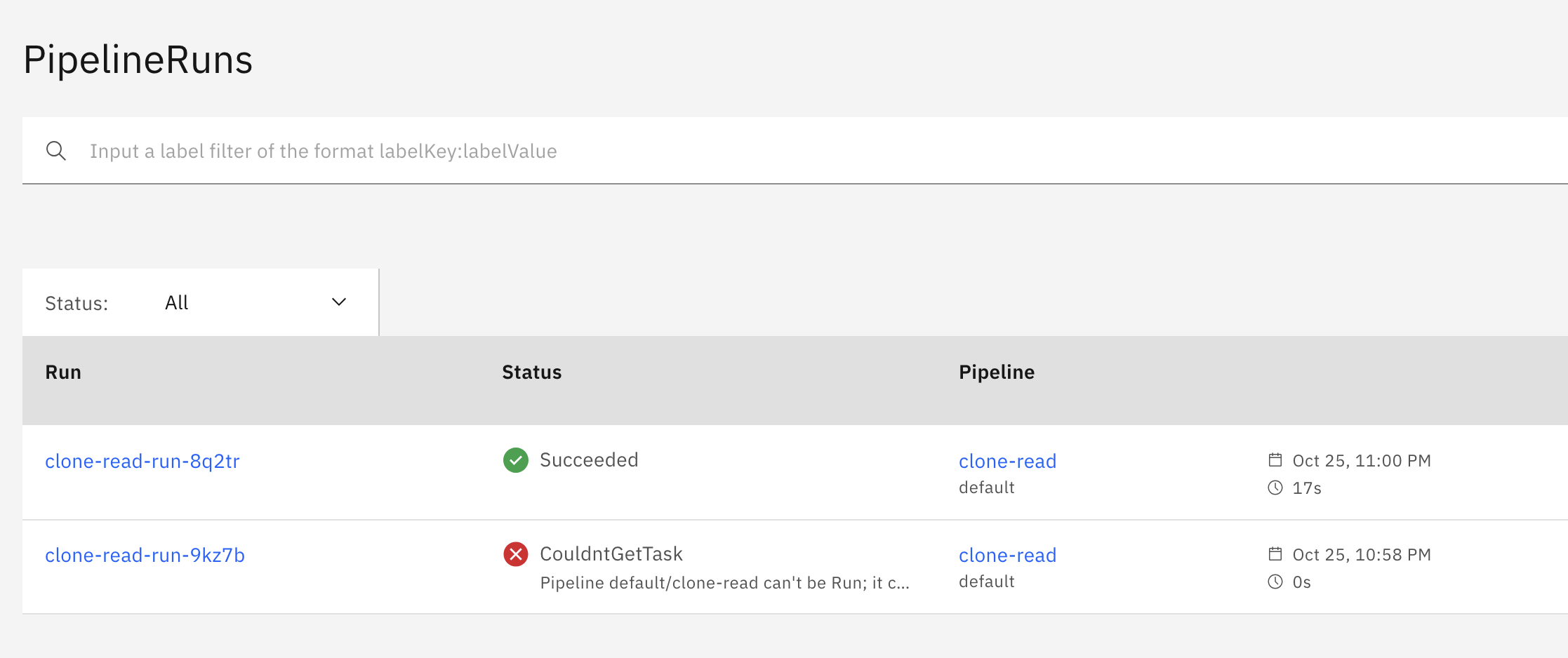
tkn pipelinerun list
NAME                   STARTED         DURATION   STATUS
clone-read-run-t9dfz   1 minute ago    17s        Succeeded
clone-read-run-lvkzq   7 minutes ago   0s         Failed(CouldntGetTask)

tkn pipelinerun logs clone-read-run-t9dfz -f
...
[fetch-source : clone] + git config --global --add safe.directory /workspace/output
[fetch-source : clone] + /ko-app/git-init '-url=https://github.com/tektoncd/website' '-revision=' '-refspec=' '-path=/workspace/output/' '-sslVerify=true' '-submodules=true' '-depth=1' '-sparseCheckoutDirectories='
[fetch-source : clone] {"level":"info","ts":1760857533.8664637,"caller":"git/git.go:176","msg":"Successfully cloned https://github.com/tektoncd/website @ e6d8959b05b8bbd4aa798b28153b25c0f8766dc7 (grafted, HEAD) in path /workspace/output/"}
[fetch-source : clone] {"level":"info","ts":1760857533.875513,"caller":"git/git.go:215","msg":"Successfully initialized and updated submodules in path /workspace/output/"}
...

# pv,pvc 확인
kubectl get pod,pv,pvc
NAME                                        READY   STATUS      RESTARTS   AGE
pod/clone-read-run-t9dfz-fetch-source-pod   0/1     Completed   0          2m24s

NAME                                                        CAPACITY   ACCESS MODES   RECLAIM POLICY   STATUS   CLAIM                    STORAGECLASS   VOLUMEATTRIBUTESCLASS   REASON   AGE
persistentvolume/pvc-7e5f5abc-801b-4de0-b38e-fc21bfe844c7   1Gi        RWO            Delete           Bound    default/pvc-035aa34a19   standard       <unset>                          2m21s

NAME                                   STATUS   VOLUME                                     CAPACITY   ACCESS MODES   STORAGECLASS   VOLUMEATTRIBUTESCLASS   AGE
persistentvolumeclaim/pvc-035aa34a19   Bound    pvc-7e5f5abc-801b-4de0-b38e-fc21bfe844c7   1Gi        RWO            standard       <unset>                 2m24s

# 실습 완료 후 삭제
kubectl delete pipelineruns.tekton.dev --all

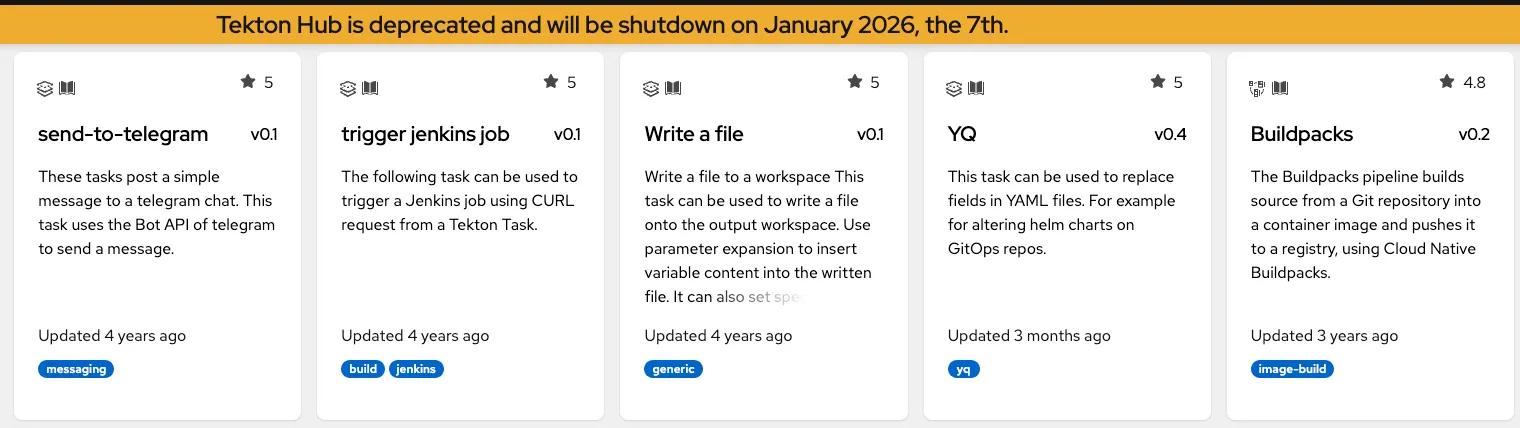
Tekton Hub(https://hub.tekton.dev) 에 등록된 공식 Task 리소스를 클러스터에 설치
Tekton Hub : 공개 제공한 Task들 ‘26년 1월 종료
Tekton Hub (deprecated)
hub.tekton.dev
Create a Task to Compile and Package an App from Private Git
업데이트중
Containerize an Application Using a Tekton Task and Buildah
업데이트중
'devops > cicd' 카테고리의 다른 글
| [CI/CD] 4주차 - Argo CD 1/3 (1) (0) | 2025.11.09 |
|---|---|
| [CI/CD] 3주차 - Jenkins CI + K8S(Kind) (1) | 2025.11.02 |
| [CI/CD] 3주차 - 실습환경구성 (0) | 2025.11.02 |
| [CI/CD] 2주차 - Helm (0) | 2025.10.25 |
| [CI/CD] 1주차 - Image Build (0) | 2025.10.18 |

